
Gym POS System: One Till for Retail and Memberships
Stop juggling Square for your pro shop and a separate app for memberships. ManageRegister is a gym POS system that shares one database with your membership billing — so the till and the member ledger can't disagree, and month-end is one report instead of two exports and a spreadsheet.

What a gym POS system actually has to do
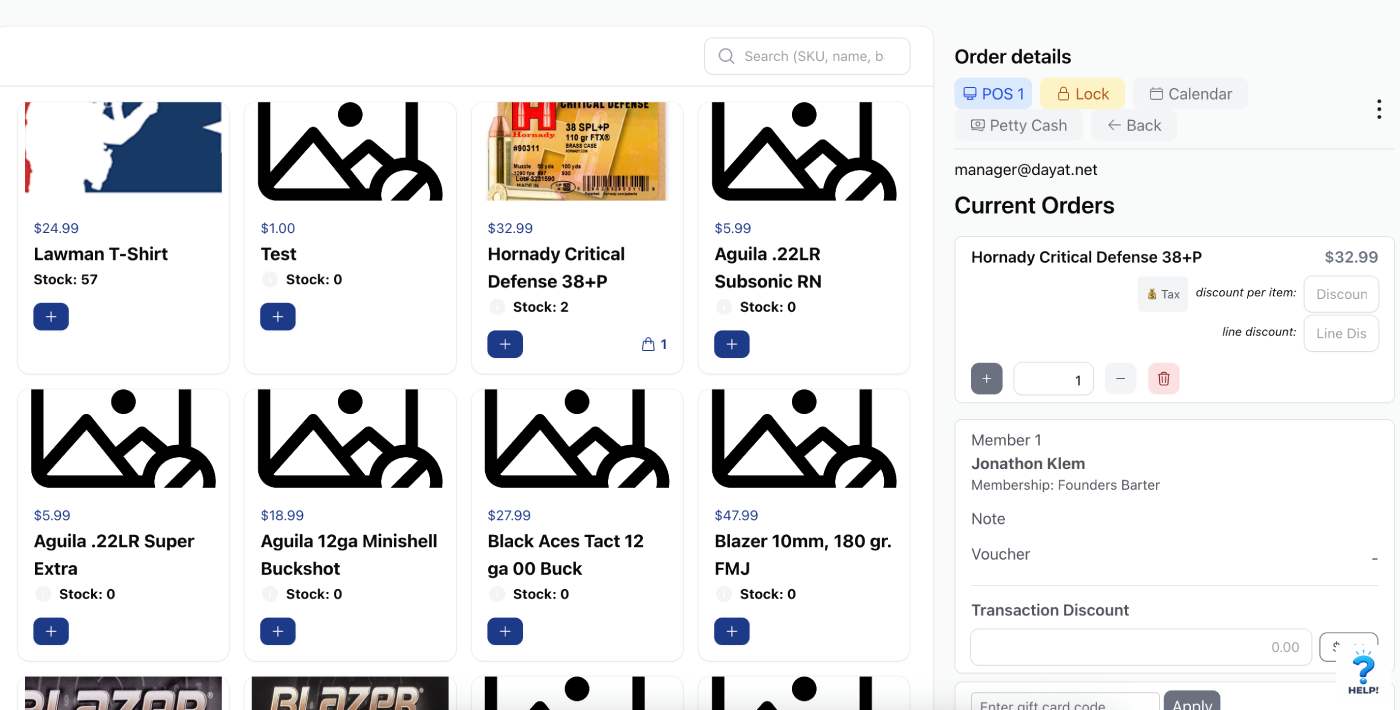
A gym POS system is the register software a fitness facility uses to take payment at the front desk. Unlike a general retail till, it has to handle recurring memberships, day passes, time-based bookings and services alongside physical products — and post every one of those sales to the right member account.
That means five jobs, not one:
- Ring up anything you sell — retail, a drop-in, an hour of court time, a training package, a repair.
- Know who's standing there. Member discounts, expired waivers and lapsed memberships should surface at the counter, not after the sale.
- Charge the card you already have. A member shouldn't have to re-swipe for a $4 water bottle.
- Keep one inventory count across the counter and the online store.
- Report retail and dues together in a single revenue figure you can hand to your accountant.
Two systems, two sets of numbers
Most gyms end up with a general retail till for the shop and gym software for the dues, instead of one gym point of sale system covering both. It works fine on any given Tuesday. It falls apart at the end of the month.
Your money lands in two merchant accounts
Retail settles into one processor, dues into another, on different deposit schedules at different rates. To answer "what did we make in August?" you export both, strip the fees out by hand, and hope you didn't double-count a refund.
A member's purchase never reaches their record
They buy a shirt at the counter. Your gym software has no idea. When they ask what they bought last month, or dispute a charge, you're piecing the answer together from two places — or saying "I'll look into that" and never doing it.
Refunds only flow one way
A retail refund goes back through the POS. Stock goes back on the shelf only if someone remembers. The member's account still shows the original sale, and your revenue report still counts it.
Inventory is a guessing game
You think you have 12 boxes of 9mm. The POS says 8. The shelf says 6. Stock adjustments happen in one system and not the other, and nobody knows the real number.
Staff have to learn two systems
Ring up protein here. Process a membership there. Run a day pass somewhere else. New hires take twice as long to train and make twice as many mistakes.
What gyms actually sell at the front desk
Most gym point of sale software is written as if a gym only sells protein bars. The facilities we work with sell four different kinds of thing, and a fitness center POS that only handles the first one isn't much use.
Retail and merch
Supplements, apparel, gear, ammo, drinks. Barcode scan, variants, stock counts, low-stock alerts.
Time you rent out
Range lanes, court hire, bay rentals, day passes. Sold at the counter, and the booking and door access follow automatically.
Services and work orders
Private training, gunsmithing, equipment repair, custom work. Open a work order, track status, invoice against the member.
Charges on account
Charge the card already on file, or put it on their tab and settle with next month's dues. Member discounts apply without anyone doing math.
One system. One dashboard. One report.
What the gym POS software does, in full. Everything below writes to the same member records your billing already uses.
Retail sales
Supplements, merch, gear, snacks — whatever you sell alongside memberships.
Gym inventory management
Stock levels with source-of-truth settings. Counter and online store draw down the same count.
Terminal support
Ingenico Lane devices via NMI for card-present transactions.
Product pages
Product images and online purchase pages so members can buy from their portal.
Work orders
Service tracking for gunsmithing, equipment repair and custom work.
Unified reporting
Membership revenue and retail revenue in one report, on one dashboard.
How Piasa Armory runs one till
Piasa Armory is a gun range and retail store in East Alton, Illinois, with about 500 members. They are the clearest example we have of the four-revenue-stream problem: a firearms store, paid range time, training classes, a gunsmith bench, plus memberships and waivers on top.
Before ManageRegister, that meant separate systems and separate numbers. Now a single sale can include a box of ammo, an hour of lane time and a gunsmith work order, with the member discount applied automatically and the whole thing posted to that member's account. Waivers are checked at the counter. Month-end is one report.
"Everything we needed in one company. ManageMemberships allows us to run our store, range, training, gunsmith, memberships, and waivers from a single source."
Read how Piasa Armory runs store, range and gunsmith on one system →
Lawman Tactical runs the same setup for ammo, targets, eye and ear protection and range rentals.
What it costs
Most vendors make you sit through a demo before they'll tell you the gym POS system cost. Here it is. A gym POS system should not need a sales call to price.
| Core plan (membership management) | $99/mo |
| ManageRegister POS add-on | $59/mo |
| Total | $158/mo |
| Enterprise | POS included |
Plus card processing on what you sell. No per-terminal fee, no per-seat fee, no setup fee. Pricing current as of September 2026 — see the full pricing page.
Hardware and what you need to start
Most POS for gyms ships with hardware you have to buy from the vendor. Our register runs in a browser, so the tablet or front-desk PC you already own is the terminal.
- Card reader — Ingenico Lane, connected through NMI, for chip and tap. Card-present rates are lower than keyed-in, so this pays for itself quickly at any real volume.
- Receipt printer — optional. Emailed receipts are the default and they attach to the member's record.
- Barcode scanner — any USB scanner works. Useful once you're past a few dozen SKUs.
- Cash drawer — optional, and plenty of our facilities skip it.
- The tablet or PC you have — iPad, Android tablet or desktop browser. No dedicated hardware purchase to get started.
Questions to ask before you buy one
Ask these of us and of anyone else you're looking at. The answers separate a real gym POS system from a retail till with a membership tab bolted on.
- Same database, or an integration? "Integrates with" means two systems syncing on a delay, and a sync that fails silently is worse than no sync at all.
- Can a member charge to their account or their card on file? If they have to re-enter a card for a bottle of water, staff will stop offering.
- Does retail show up in the same revenue report as dues? Or are you still exporting two CSVs in January?
- What's the processing rate on retail versus recurring dues? They're often different, and the retail rate is the one nobody quotes you.
- Do refunds flow both ways? A refund should reverse the charge, restock the item and correct the revenue report without three manual steps.
Related reading
Gym POS system for gun ranges specifically
Lane time, FastBound, gunsmith work orders and what changes when you sell firearms.
How we compare to GymDesk
Side by side on POS, billing and what each platform charges.
How we compare to GymMaster
Side by side on POS, stock control and member accounts.
What happens when a member's card fails
Dunning and recovery on the same card the POS charges.

Written by Jon Klem, founder of ManageMemberships. I build the gym POS system and I install it on-site at gyms and ranges, so most of what's on this page came from watching people ring up sales at their own front desk. Last updated 6 September 2026.
One gym POS system. Memberships and retail.
Free tier supports up to 50 members. No credit card required. Bring your existing tablet.
Running a range? Start with the gun range POS guide · Watch the interactive demo